

User guide
Find your way around our hospitals
This guide explains how to use the digital hospital map to search for departments, clinics, wards and facilities, and navigate around St George’s Hospital and Epsom Hospital.
Using the map
For the best experience, we recommend downloading the MazeMap app from the Apple App Store or Google Play before scanning a QR code.
However, if you prefer, you can simply scan any QR code to open the map instantly in your phone’s web browser – no download is required.
1. Select your hospital
Select the button below to choose either St George’s Hospital or Epsom Hospital before searching for your destination. You can also select the hospital directly on the map.

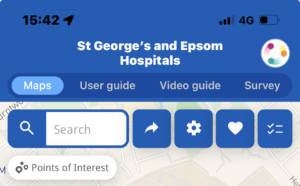
2. Search for your destination
Search for the name of the clinic, department, ward or facility you want to visit.
You can find the name of your destination on your appointment letter.
Your destination will be highlighted on the map.

Then select directions.

3. Choose your starting point on the map (From)
Select your starting point by either searching or clicking in the map such as car park 1.
Your starting location will be shown.

4. Start navigation
Select start navigation. Your route and time to destination will be shown on the map.
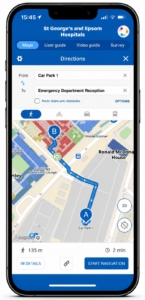
5. Follow the step-by-step directions
The map will guide you through each part of your journey, including changes of floor where required.
Video guide
Watch our short video showing how to search for a destination and follow a route
Helpful features
1. Search from your home address
You can plan your route from your home address before travelling to the hospital.

2. Accessible routes
You can choose an accessible route that avoids stairs and uses lifts where available. Select “Options” beneath Directions and choose “Avoid Stairs and Obstacles”.
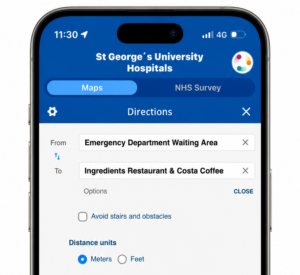
3. Share a location with another person
You can generate and share a QR code for a location with another person.

4. Points of interest
You can choose key points of interest including parking, baby changing facilities, and the Emergency Department.
5. Move between floors
The map will show when you need to use stairs or a lift and will update the route for the next floor.

Frequently asked questions
Do I need to download an app?
No. The map opens in your phone’s internet browser, so you do not need to download anything.
Do I need to create an account?
No. You can use the map without registering or providing personal information.
Can I plan my journey before arriving?
Yes. You can open the map before travelling and search for your destination in advance.
What should I do if I cannot find my destination?
Try searching using part of the clinic, department or ward name. You can also ask a member of staff or speak to a volunteer or receptionist for help.
Does the map track my location?
Your phone may ask for permission to use your location. You can choose whether to allow this and can still search for destinations manually.
Tell us what you think
Your feedback will help us improve the hospital map and make it easier for patients and visitors to find their way around.
Need help?
Please speak to a member of staff or visit one of the main reception desks if you need help finding your destination.